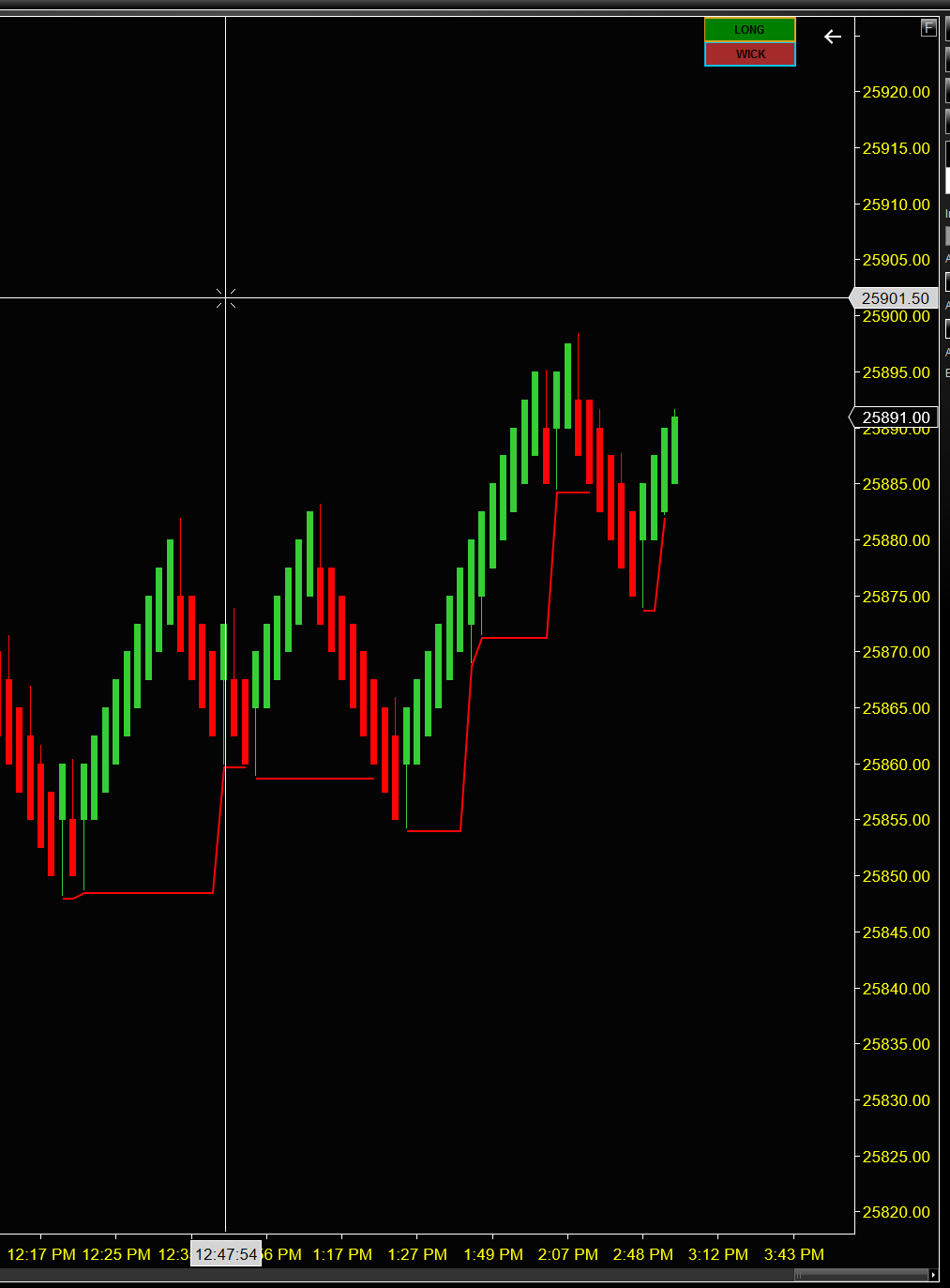
What the Trailer indicator does
Deciding where to trail a stop is one of the hardest parts of managing a trade. The Trailer indicator calculates and draws a dynamic trailing stop level on your chart for long or short positions, using four different trailing methods. It's optimized for Renko-type bars, ideally ones that show wicks.
Two buttons in the top-right corner of the chart switch the direction and the trailing method instantly, without recalculating historical data, so you can compare methods on the same price action in seconds.
- Four trailing methods: Bar, Pattern 1, Pattern 2 and Wick, from aggressive to conservative.
- Long or short with one click on the chart.
- The trail only moves in your favor: up for longs, down for shorts.
- Breach detection: when price crosses the trail, it resets and starts tracking again.
- ATM-ready: attach a NinjaTrader stop loss to the trail so your stop follows it automatically.
Watch it in action
Four trailing methods
Bar: bar by bar
The most aggressive method. For longs, the trail moves to the low of each bullish bar; for shorts, to the high of each bearish bar. Suited to fast-moving markets and quick moves.
Pattern 1: single reversal
Updates on a two-bar reversal: for longs, a bearish bar followed by a bullish bar; for shorts, a bullish bar followed by a bearish bar. Trend following with pattern-based confirmation.
Pattern 2: double reversal
A more conservative three-bar pattern: for longs, two bearish bars followed by a bullish bar; for shorts, two bullish bars followed by a bearish bar. Suited to longer trends, and it helps reduce false signals.
Wick: wick-based swings
Updates on rejection bars: for longs, bullish bars with a bottom wick of at least MinWickTickSize ticks; for shorts, bearish bars with a top wick of at least that size. Best on bars with meaningful wicks, such as NinzaRenko.
How the trail works
- Start: the trail begins at the low of the first bullish bar (long) or the high of the first bearish bar (short).
- Updates: it only moves in your favor, to higher lows for longs and lower highs for shorts.
- Breach: when price crosses the trail by more than the TickOffset, the trail resets and starts tracking again from the next qualifying bar.
Short gaps or transparent segments in the line mark those restarts, so you can see where each trail began.
The trail line represents the stop level. A breach suggests the move may be ending, which you can use as a cue to exit or to tighten your actual stop.
Attach your stop loss to the trail
The Trailer is a visual aid, not an automated trading system. But NinjaTrader lets you attach an ATM strategy's stop loss to an indicator plot, so your stop follows the trail automatically. NinjaTrader's help guide on attaching orders to an indicator explains the steps.
The indicator has eight plots, one for each direction and method. Select the one that matches what's on your chart:
- Long: LongBar, LongPattern1, LongPattern2, LongWick
- Short: ShortBar, ShortPattern1, ShortPattern2, ShortWick
For example, trading long with the Bar method means tracking LongBar. If you switch to Pattern 1 on the chart, switch your ATM to LongPattern1 too.
Settings
| Setting | Default | What it does |
|---|---|---|
| Lookback | 15 | Bars required before the indicator starts calculating. Increase for more historical context. |
| MinWickTickSize | 1 | Minimum wick size, in ticks, for a bar to count as a swing in the Wick method. |
| TickOffset | 1 | Ticks beyond the trail needed to trigger a breach. Also offsets the drawn line from the price level. |
Tips for using it
- Match the method to the market. Bar in strong trends to lock in gains quickly; Pattern 1 or Pattern 2 in choppy markets to avoid whipsaws; Wick on bars with meaningful wicks.
- Plan your exit before you enter. Use the trail to see where a stop would sit and when a trend may be ending.
- Tune it to your instrument. Higher MinWickTickSize values give fewer but more significant swing points.
Installation and activation
- Download the zip above. In NinjaTrader 8, go to Tools → Import → NinjaScript Add-On… and select the indicator's add-on zip. It compiles automatically. The PDF user guide in the download walks through every step.
- Add it to a chart: right-click the chart, choose Indicators… and pick Tradebrary → Trailer.
- Order on Whop to receive your Whop license key.
- In NinjaTrader, open Help → About and copy your Machine ID.
- On the Activate page, enter your Whop license key and Machine ID to get your indicator key.
- Paste that key into the indicator's LicenseKey setting and click OK.
Each license covers up to 2 computers. If you reinstall NinjaTrader or switch computers, simply activate again. If you've reached the 2-computer limit, email support@tradebrary.com to free up a slot.
Frequently asked questions
Which bar types does it work best on?
It's optimized for Renko-type bars, ideally ones that show wicks. The Wick method needs bars with visible wicks, such as NinzaRenko.
Does it place orders for me?
No. It draws the trail on your chart. You can attach an ATM strategy's stop loss to one of its plots, and NinjaTrader will then move your stop with the trail.
Why don't I see a trail line?
Load enough bars (at least the Lookback plus 5) and check the direction button: a long trail sits below price and a short trail above it.
Why is there a gap in the trail line?
Gaps or transparent segments mark a restart, when the trail first starts or right after a breach.
The trail is too tight or too loose. What can I change?
Too tight: try Pattern 1 or Pattern 2, or increase TickOffset. Too loose: try Bar, or decrease TickOffset (the minimum is 0).
How many computers can I use it on?
Each license covers up to 2 computers. Activation takes a few minutes on the Activate page.
Is it included in the bundle?
Yes. The NinjaTrader bundle includes all seven Tradebrary indicators at a discounted price.
Can I get a refund?
Because the indicator is digital and delivered instantly, all sales are final once license keys are issued. Please read the user guide and our Refund Policy before purchasing.
Related indicators
Get the Trailer indicator
Includes the PDF user guide and direct email support.
By purchasing, you agree to our Terms, License, and Risk Disclaimer. Trading involves risk of loss.